使用bleve做商品搜索时遇到的坑和解决方案
发布时间:2022-05-25
今天花了一整天在做公司运营的的一个老电商平台的改造,很简单的一个商品搜索居然弄了一天才做好,需求背景是这样的,公司一个电商平台的之前一直是H5做的,最近受疫情影响,平台订单很多都发不了快递,所以公司趁这段时间正好再做一下电商平台的改造和升级,最近技术体系编程语言已经逐步从java转向golang,所以随带着对应的工具包也需要发生改变,本文就主要讲一下支撑商品搜索用bleve第三方包遇到的坑。
bleve是golang语言体系中最有影响力的全文检索包,在技术选型的时候查看了好几天的技术资料,比较了几个全文检索包之后最终选定的还是bleve,其中最看重的是有geo的检索接口,这个接口在后续做附近搜索时会用得到,所以斟酌再三就选择bleve做商品的全文检索了。
下边是bleve的索引和搜索的工具包代码,希望能帮到同行小伙伴。
package utils

import (
	"fmt"
	"os"
	"yurongMall/internal/model/entity"

	"github.com/blevesearch/bleve/v2"
	"github.com/gogf/gf/v2/util/gconv"
)

type goods struct {
	Id    int64  `json:"id"`
	Name  string `json:"name"`
	Imgs  string `json:"imgs"`
	Price string `json:"price"`
}

func SearchGoodsIndex(entity *entity.YrGoods) {
	mapping := bleve.NewIndexMapping()
	index, err := bleve.New("bleve.goods", mapping)

	if err != nil {
		fmt.Println(err)
		index, err = bleve.Open("bleve.goods")
	}
	defer index.Close()
	// index some data
	err = index.Index(gconv.String(entity.Id), entity)
	if err != nil {
		fmt.Println(err)
		return
	}
}
func SearchGoodsListIndex(list []entity.YrGoods) {
	os.RemoveAll("bleve.goods")
	mapping := bleve.NewIndexMapping()
	index, err := bleve.New("bleve.goods", mapping)
	if err != nil {
		fmt.Println(err)
		index, err = bleve.Open("bleve.goods")
	}
	defer index.Close()
	//index.FieldDict("name")
	// index some data
	for i := range list {
		goodsD := goods{
			Id:    list[i].Id,
			Name:  list[i].Name,
			Imgs:  list[i].Imgs,
			Price: list[i].Price,
		}
		fmt.Println(gconv.String(goodsD.Id) + "索引:" + goodsD.Name)
		err = index.Index(gconv.String(goodsD.Id), goodsD)
	}
	if err != nil {
		fmt.Println(err)
		return
	}
}
func SearchGoods(kw string, page int, size int) *bleve.SearchResult {
	index, err := bleve.Open("bleve.goods")
	if err != nil {
		fmt.Println(err)
	}
	defer index.Close()
	// search for some textm
	query := bleve.NewMatchQuery(kw)
	searchRequest := bleve.NewSearchRequest(query)
	searchRequest.From = (page - 1) * size
	searchRequest.Size = size
	searchRequest.Highlight = bleve.NewHighlight() //增加高亮显示后,在返回结果中才能有Fragments

	searchRequest.Highlight.AddField("name") //指定在Fragments中显示的内容
	searchRequest.Highlight.AddField("imgs")
	searchRequest.Highlight.AddField("price")
	searchResults, err1 := index.Search(searchRequest)
	if err1 != nil {
		fmt.Println(err1)
	}
	return searchResults
}
商品建立索引和搜索的函数如下:
func (c *cGoods) SearchGoods(ctx context.Context, req *v1.SearchGoodsListReq) (res *v1.Res, err error) {
	kv := g.RequestFromCtx(ctx).Get("kv").String()
	page := g.RequestFromCtx(ctx).Get("page").Int()
	limit := g.RequestFromCtx(ctx).Get("limit").Int()
	result := utils.SearchGoods(kv, page, limit)
	// for i := range result.Hits {
	// 	hit := result.Hits[i]
	// 	fmt.Println(hit.Fragments["name"])
	// }
	g.RequestFromCtx(ctx).Response.WriteJson(result)
	return
}
func (c *cGoods) IndexGoods(ctx context.Context, req *v1.IndexGoodsReq) (res *v1.Res, err error) {
	list := service.GoodsService.GetGoodsList(ctx)
	utils.SearchGoodsListIndex(list)
	result := v1.Result{
		Code: 200,
		Msg:  "索引完成",
		Data: nil,
	}
	g.RequestFromCtx(ctx).Response.WriteJson(result)
	return
}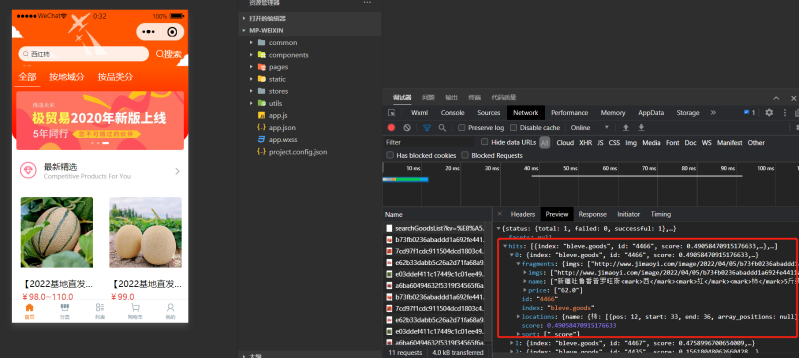
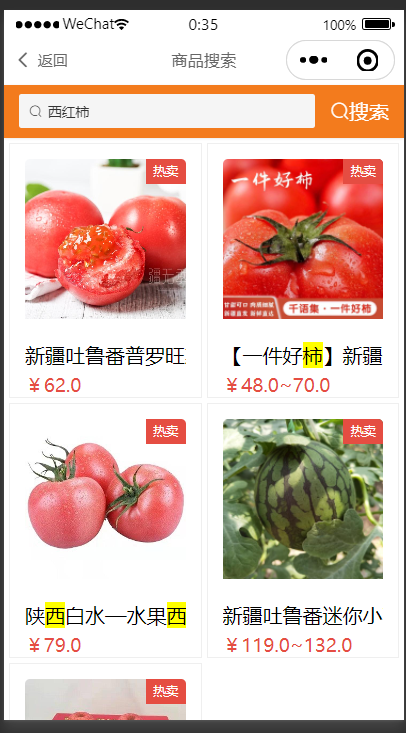
先建立所有商品索引后,再搜索关键字即可显示对应的产品清单,并对关键词进行分词高亮显示。
【声明】:LifeAdd生活方式登载该文章目的是为更广泛的传递行业信息,不代表赞同其观点或证实其描述,本网站亦不为其版权负责。若无意侵犯您合法权益的内容,请联系本网站,核实后将立即予以删除!